Lenovo L22e-40 21.5 Inch FHD WLED HDMI, VGA Professional Monitor
$52.83
$70.26
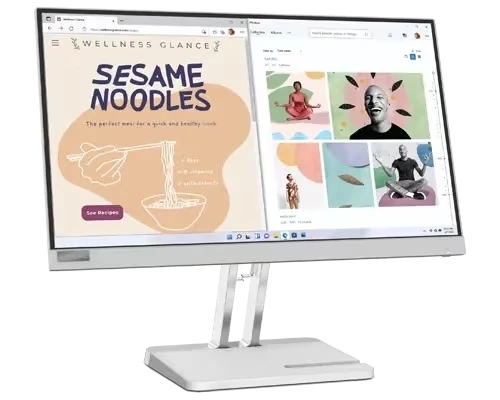
Finding the perfect monitor for professional work, entertainment, or daily computing tasks can be challenging with countless options flooding the market. The Lenovo L22e-40 21.5-inch FHD monitor stands out as an excellent choice for users seeking a balance between affordability, performance, and reliability. In this comprehensive guide, we’ll explore everything you need to know about this professional-grade display and why it might be the perfect addition to your workspace. Meet the Lenovo L22e-40 The Lenovo L22e-40 is a professionally designed monitor that combines modern aesthetics with practical functionality. This 21.45-inch display features a VA panel with FHD resolution and a smooth 75Hz refresh rate, complemented by AMD FreeSync technology. With its sleek cloud grey finish and contemporary slim design, this monitor seamlessly integrates into any office, home, or gaming setup. Lenovo has positioned this monitor as an all-rounder that caters to professionals who need reliable performance for spreadsheets and documents, content creators who value color accuracy, and casual users who enjoy streaming movies and videos. The 3-side near-edgeless panel design provides a wider viewing experience, perfect for large Excel sheets or cinematic entertainment. Key Features That Set the Lenovo L22e-40 Apart Stunning Full HD Visual Experience The monitor delivers crystal-clear visuals with its FHD (1920 x 1080) resolution, ensuring that every detail in your work documents, photos, and videos appears sharp and vibrant. Whether you’re editing presentations, analyzing data, or watching your favorite shows, the Full HD resolution provides excellent clarity for a 21.5-inch screen size. Superior VA Panel Technology The VA (Vertical Alignment) panel offers impressive 178-degree viewing angles both horizontally and vertically, meaning colors and contrast remain consistent even when viewed from the side. This makes it ideal for collaborative work environments where multiple people may view the screen simultaneously. The VA panel also provides an exceptional static contrast ratio of 3000:1, delivering deeper blacks and brighter whites compared to standard IPS panels. Smooth 75Hz Refresh Rate with AMD FreeSync The 75Hz refresh rate ensures a smooth viewing experience, significantly reducing motion blur compared to standard 60Hz monitors. Combined with AMD FreeSync technology, this monitor eliminates screen tearing and stuttering during video playback and light gaming, providing fluid visuals whether you’re scrolling through documents or playing casual games. Eye Comfort Technology Long hours in front of a screen can strain your eyes, but Lenovo has addressed this concern thoughtfully. The monitor features Natural Low Blue Light technology that prioritizes eye comfort without compromising clarity. This reduces harmful blue light emission, minimizing eye fatigue during extended work sessions. With a brightness level of 250 cd/m², the display provides adequate illumination for various lighting conditions. Versatile Connectivity Options The L22e-40 offers versatile connectivity with both HDMI 1.4 and VGA ports, ensuring compatibility with both modern and legacy devices. Whether you’re connecting a new laptop via HDMI or an older desktop computer through VGA, this monitor has you covered. This dual connectivity makes it an excellent choice for offices upgrading their equipment gradually or users who work with multiple devices. Space-Saving Design The monitor boasts a very clean, contemporary look with a slim head design that minimizes desk clutter. The three-sided near-edgeless bezel maximizes screen real estate while maintaining a compact footprint, making it perfect for multi-monitor setups or small workspaces where every inch of desk space matters. Read More Lenovo L22e-40 Technical Specifications Specification Details Screen Size 21.45 inches (21.5″) Display Type VA (Vertical Alignment) Panel Backlight WLED (White LED) Resolution 1920 x 1080 (Full HD) Aspect Ratio 16:9 Refresh Rate 48Hz – 75Hz Response Time 4ms (Extreme mode) / 6ms (Typical) Brightness 250 cd/m² (nits) Contrast Ratio 3000:1 (Static) / 3,000,000:1 (Dynamic) Viewing Angles 178° (H) / 178° (V) Color Gamut 72% NTSC Connectivity 1x HDMI 1.4, 1x VGA Display Area 478.7 x 260.3 mm Dimensions (with stand) 489.16 x 290.3 x 41 mm Weight 2.2 kg (4.85 lbs) Stand Adjustment Tilt (-5° to 22°) VESA Mount Yes (75mm x 75mm) Special Features AMD FreeSync, Natural Low Blue Light, Anti-Glare coating Certifications Eyesafe® 2.0 Color Cloud Grey Power Consumption Typical operation: <15W Who Should Buy the Lenovo L22e-40? Office Professionals If you spend your day working with spreadsheets, documents, and presentations, this monitor is an excellent investment. The FHD resolution ensures text remains crisp and readable, while the VA panel’s superior contrast makes reading extended documents more comfortable. The anti-glare coating reduces reflections from office lighting, and the Natural Low Blue Light technology protects your eyes during long workdays. Small Business Owners For small businesses looking to equip their office with reliable, professional-grade monitors without breaking the bank, the L22e-40 offers exceptional value. The dual connectivity options ensure compatibility with various computers, making it easy to standardize equipment across your organization. Students and Educators Students need a reliable display for online classes, research, and assignments. The 21.5-inch screen provides ample workspace without overwhelming a dorm room or small study area. Educators can use it for lesson planning, grading, and virtual teaching with confidence in its performance and eye-comfort features. Home Entertainment Users While primarily marketed as a professional monitor, the L22e-40 excels at entertainment. The 75Hz refresh rate and AMD FreeSync make it suitable for streaming movies and TV shows with smooth motion. The wide viewing angles mean family members can watch together without color distortion from side angles. Budget-Conscious Gamers Though not a dedicated gaming monitor, casual gamers will appreciate the 75Hz refresh rate and AMD FreeSync support for light gaming. It’s perfect for strategy games, indie titles, and older games where ultra-high refresh rates aren’t critical. The 4ms response time in extreme mode helps reduce ghosting in fast-moving scenes. Multi-Monitor Setups The slim bezel design makes this monitor ideal for dual or triple-monitor configurations. Whether you’re a day trader monitoring multiple charts, a content creator needing extra workspace, or a professional requiring extended desktop real estate, these monitors align beautifully side-by-side with minimal gap. Advantages of Choosing the Lenovo L22e-40 Excellent Price-to-Performance Ratio: This monitor delivers professional-grade features at an affordable price point, making premium display quality accessible to budget-conscious buyers. Eye Health Priority: The Natural Low Blue Light and Eyesafe® 2.0 certification demonstrate Lenovo’s commitment to user wellbeing, reducing eye strain during extended use. Versatile Connectivity: Both HDMI and VGA ports ensure you won’t need adapters for most devices, simplifying setup and reducing cable clutter. Energy Efficient: With typical power consumption below 15W, this monitor helps reduce electricity costs while being environmentally friendly. Reliable Brand: Lenovo’s reputation for quality and durability means you’re investing in a monitor that will serve you reliably for years. Space-Efficient Design: The compact footprint and lightweight construction make it easy to position, transport, and adjust as needed. Important Considerations Before Purchase No Built-in Speakers Unlike some monitors in its class, the L22e-40 does not include built-in speakers. You’ll need external speakers or headphones for audio output. However, this keeps the monitor’s price competitive and allows you to choose audio quality that suits your preferences. Limited Ergonomic Adjustments The stand offers tilt adjustment only (-5° to 22°), without height, swivel, or pivot capabilities. If you need more flexibility, consider purchasing a VESA-compatible monitor arm, as the monitor supports 75mm x 75mm VESA mounting. 60Hz Native Performance While the monitor supports up to 75Hz, optimal performance at this refresh rate may require specific settings and proper cable connections. Some users report 60Hz as the default setting that requires manual adjustment. Response Time Considerations The 4ms response time in extreme mode is adequate for casual gaming and general use, but competitive gamers seeking ultra-fast response times might prefer dedicated gaming monitors with 1ms response times. Setup and Installation Tips Use HDMI for Best Results: While both HDMI and VGA are available, HDMI provides superior image quality and supports the full 75Hz refresh rate. Reserve VGA for legacy device compatibility only. Calibrate Your Display: Take a few minutes to adjust brightness, contrast, and color settings to your preference. The default settings are optimized for general use but may not suit your specific needs. Enable AMD FreeSync: If you have a compatible AMD graphics card, enable FreeSync in both the monitor’s OSD menu and your graphics card settings for the smoothest experience. Position Properly: Place the monitor at arm’s length with the top of the screen at or slightly below eye level to reduce neck strain. Activate Blue Light Filter: Enable the Natural Low Blue Light feature, especially if you work late hours or in dimly lit environments. Maintenance and Care To ensure your Lenovo L22e-40 provides years of reliable service: Clean Regularly: Use a microfiber cloth to gently wipe the screen. Avoid harsh chemicals or abrasive materials. Proper Ventilation: Ensure adequate airflow around the monitor to prevent overheating. Cable Management: Secure cables to prevent strain on ports and maintain a tidy workspace. Power Off When Unused: While energy-efficient, turning off the monitor when not in use extends its lifespan. Avoid Direct Sunlight: Position away from windows where direct sunlight could damage the screen over time. Price and Value Proposition in Bangladesh The Lenovo L22e-40 monitor is priced starting from 12,300 BDT in Bangladesh, making it an affordable option for professionals and home users alike. This competitive pricing, combined with Lenovo’s reputation for reliability and the monitor’s impressive feature set, delivers exceptional value for money. When compared to competitors in the same price range, the L22e-40 stands out with its VA panel’s superior contrast ratio, 75Hz refresh rate, AMD FreeSync support, and eye-care certifications. These features are typically found in monitors priced significantly higher, making this an attractive option for budget-conscious buyers who refuse to compromise on quality. Final Verdict: Is the Lenovo L22e-40 Worth It? The Lenovo L22e-40 21.5-inch FHD monitor successfully balances performance, features, and affordability. Its VA panel delivers excellent contrast and viewing angles, the 75Hz refresh rate provides smooth visuals, and the eye-care technologies ensure comfortable extended use. While it lacks built-in speakers and extensive ergonomic adjustments, these omissions help maintain its competitive price point. For office professionals, students, small businesses, and home users seeking a reliable, high-quality display without premium pricing, the L22e-40 is an excellent choice. Its versatile connectivity, modern design, and practical features make it suitable for diverse applications from productivity work to entertainment. Whether you’re upgrading from an older monitor, building a new workspace, or need a secondary display, the Lenovo L22e-40 delivers consistent performance and value that’s hard to beat in its price category. It’s a smart investment that will serve you well for years to come. Where to Buy The Lenovo L22e-40 is available at authorized retailers across Bangladesh, including online stores and physical showrooms. Always purchase from authorized dealers to ensure genuine products, valid warranty coverage, and reliable after-sales support. Compare prices and check for bundle offers that might include accessories like HDMI cables or monitor mounts to maximize your investment. Ready to enhance your productivity and viewing experience? The Lenovo L22e-40 professional monitor offers the perfect combination of quality, performance, and value to meet your display needs. Dahua DHI-LM22-A201YFS 21.45″ IPS Full HD 100Hz Monitor
Monitor